Introduction
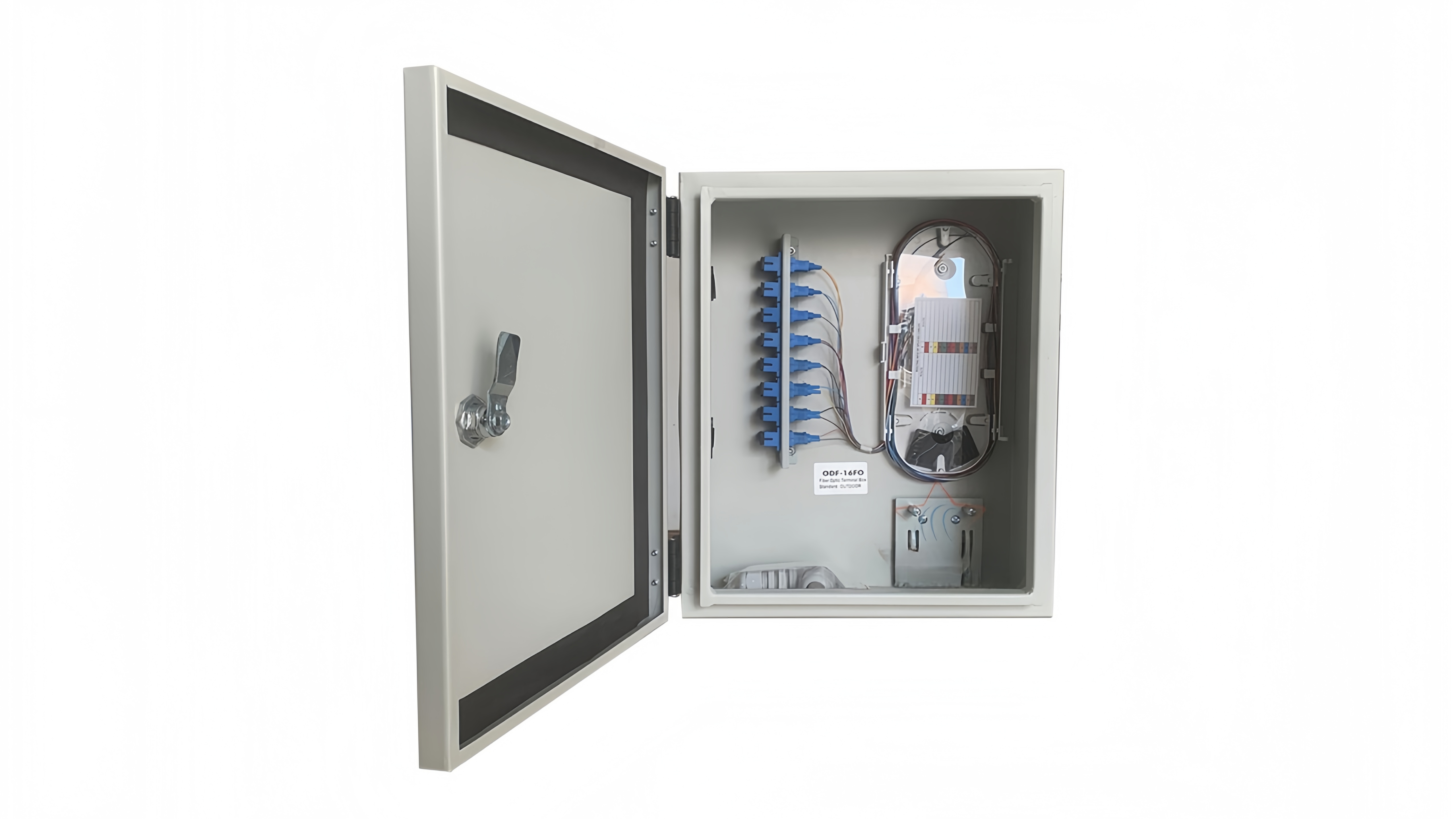
Choosing the right fiber optic termination box is not only about indoor vs outdoor protection or enclosure material. In real FTTH deployments, the most common long-term issue is capacity—specifically, selecting a box that looks adequate on paper but becomes overcrowded once splicing, routing, and subscriber expansion begin.
A termination box that is too small can create tight bends, messy fiber routing, and difficult maintenance. On the other hand, oversizing without planning may increase cost and installation complexity. This guide explains how to evaluate fiber termination box capacity correctly, including fiber count, port configuration, splitter accommodation, and future growth.
What “Capacity” Really Means in a Termination Box
Many buyers assume “capacity” simply means the number of adapter ports on the front panel (for example, 8 ports or 16 ports). In reality, termination box capacity includes three different limits:
- Adapter port count (how many connectors can be presented)
- Splice capacity (how many fibers can be spliced safely)
- Storage and routing space (whether fibers can be organized without violating bend radius)
In practice, the real bottleneck is often internal routing space rather than port count. That is why planners focus on how many fibers a termination box can hold safely before ordering.
Step 1: Start with Subscriber Count and Drop Cable Planning
In FTTH, capacity should start with the number of subscribers the termination point must serve. A single termination box may serve:
- 1 home (single dwelling)
- 4–12 apartments (small MDU)
- 16–48 apartments (large MDU corridors)
- multiple floors or zones (depending on design)
When planning, you should consider not only current occupancy but also whether new apartments, offices, or tenant units may be added later. This is especially common in multi-dwelling buildings where providers expand fiber service gradually.
A useful approach is to size the box based on termination box sizing for apartment building fiber networks, because MDU scenarios often represent the most complex real-world conditions.
Step 2: Understand Splice Tray Limits (Not Just Ports)
Splice trays have a physical limit for:
- splice sleeve positions
- fiber routing channels
- slack storage length
- separation between incoming and outgoing fibers
A box may advertise “16 ports,” but if it only includes a single small splice tray, it may not support 16 clean splices without forcing tight bends.
For reliable performance, installers often evaluate splicing capacity vs adapter port count in termination boxes rather than relying on the product label alone.
Step 3: Consider Splitter Space and Pigtail Routing
In many PON designs, splitters are installed upstream in a fiber distribution box. However, in compact FTTH builds, splitters may be integrated inside the termination box or mounted in the same location.
If you plan to use PLC splitters, you must account for:
- splitter body size (ABS module, LGX, mini type)
- pigtail length and routing
- mounting position
- bend radius protection
- connector access and labeling
This is where many termination boxes fail in real deployment: they technically fit the splitter, but the pigtails become crowded and messy.
When evaluating products, focus on termination boxes designed for PLC splitter integration, because these models include routing channels and mounting space specifically for splitter pigtails.
Step 4: Plan for Maintenance, Not Just Installation
A termination box might look neat on day one, but capacity problems often appear during:
- subscriber additions
- re-splicing after cable damage
- connector replacement
- fiber rerouting during network upgrades
A box that is too small forces technicians to remove splices or disturb existing fibers, increasing the risk of service interruption.
This is why engineers evaluate easy access fiber management for future subscriber expansion, not just whether the box can be installed quickly.
Step 5: Indoor vs Outdoor Capacity Differences
Indoor and outdoor termination boxes are not only different in protection level—they also differ in internal layout.
Outdoor boxes often include:
- stronger mounting base
- thicker housing
- sealing gaskets
- water-drain or pressure-relief design
- more structured routing channels
Because of this, outdoor boxes sometimes provide better internal routing even at the same port count. If your termination point is installed in semi-outdoor areas (corridors with moisture, basements, parking zones), choosing the correct type matters.
A common best practice is to size capacity while considering indoor vs outdoor termination box selection for FTTH sites, because the environment directly affects internal routing stability.
Step 6: A Practical Capacity Checklist (Engineer-Friendly)
Before final selection, use this checklist:
✔ Adapter & Port Planning
- How many subscriber connectors are required today?
- Will you need spare ports for future additions?
✔ Splice Tray & Fiber Routing
- How many splices can the tray support without overlap?
- Are routing channels wide enough for drop cables?
✔ Splitter & Pigtail Space
- Will the box house a PLC splitter?
- Is there a fixed mounting position for the splitter?
✔ Maintenance and Field Work
- Can technicians access splices without disturbing other fibers?
- Is there slack storage space for re-termination?
✔ Labeling & Identification
- Are port numbers and fiber routing clearly defined?
- Is there enough space for proper labeling?
If a box cannot pass these checks, its capacity is effectively smaller than the product name suggests.
Conclusion
Fiber termination box capacity is one of the most important factors in FTTH network reliability. Proper sizing requires more than counting ports—you must evaluate splice tray limits, routing space, splitter accommodation, and maintenance needs.
By planning capacity around subscriber growth and real field operations, you can avoid overcrowding, reduce rework, and improve long-term network stability.




 English
  Español